

 USD
USD EUR
EUR GBP
GBP CAD
CAD AUD
AUD PLN
PLN CNY
CNY JPY
JPY SEK
SEK
 English
 简体中文
简体中文 繁体中文
繁体中文 Deutsche
 Italiano
 한국어
한국어 日本語
日本語 عربى
عربى русский
 français
 Türk
Türk Română
 Magyar
 Español
 Português
 Nederlands
 čeština
 Polska
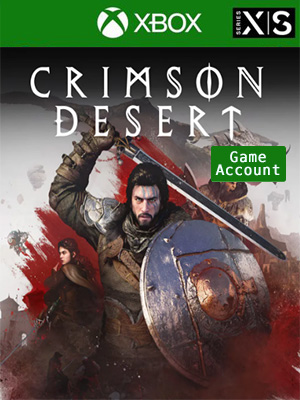
 NO KEY - YOU WILL RECEIVE AN ACCOUNT THAT WILL ALLOW YOU TO DOWNLOAD THE GAME.
 Xbox Live
 English
 German
 Italian
 Chinese Simplified
 English - US
- + SEE ALL


NO KEY - You will receive an Account that will allow you to download the game. You will be able to play it from your own account, forever.
We offer lifetime warranty for our products. If you cannot access the account you received, we will give you a new one for free. The warranty gets voided if you change the email address or any other info of the account.
■ EXPLORE A WORLD OF DISCOVERY
Welcome to Pywel.
Here you'll find stretches of natural beauty and wilderness—from green plains and woods to arid deserts and rugged mountains. Between destinations, you will come across landmarks, ancient ruins, hidden treasures, and other points of interest that will draw your curisoity to wander.
Your journey will also inevitably take you skyward to the mysterious realm known as the Abyss, where a mystical imbalance endangering the world must be restored.
The world is yours to explore as you will and there are many paths for you to uncover.
Experience the continent's stories and tales through quests, encounters, challenges, and battles.
Roam the lands on various mounts from horses to even a dragon and mechs, and scale cliffsides and walls which you can leap from to glide.
■ FORGE YOUR OWN COMBAT
On the unforgiving battlefields of Crimson Desert, there is no single path to victory.
Grow your arsenal of skills, weapons, and equipment—and decide how you want to use them.
Wield weapons like swords, spears, greatswords, axes, dual wields, various ranged weapons, and more, and unleash powerful abilities and elemental enhancements through lethal combinations.
With every strike and move, forge your own way in a world where a split second can decide your fate in fast-paced, visceral battles.
From ruthless warriors to fearsome beasts, there are those in Pywel who will seek your downfall. Encounter a diverse array of challenging enemies and bosses in brutal one-on-one duels, large-scale battle clashes, and quick skirmishes, and prevail against the threats that stand in your way.
■ LIFE IN PYWEL
In Pywel, many of the smaller moments also shape your journey and make up your day-to-day life.
Gather resources, cook, fish, hunt, and partake in the other various activities of Pywel for stat replenishment, making your equipment stronger, and more.
Along the way, enjoy some leisure time by playing minigames with the locals.
And shaping your daily life also extends to customization. Adjust hairstyles, tattoos, outfits, and more using dyes you brew or pick up along your journey.
To install the games on XBOX Series X|S
Press the X button on the controller and navigate all the way to the right on the "Profile & System" tab
Navigate to "Add or switch" and pick it
Click "Add new" on the bottom left
Type in the email received from us, make sure you don't mistype I (uppercase i) with l (lowercase L)
Type in the password, remember that password is case sensitive and again, don't mistype I with l
Note: Sometimes a security code is needed (because you log in from a new device), press Next and get your login code from this page. Type in the code and confirm
Click "Next"
Click "No thanks"
Click "Next"
Select "No barriers"
On the "Link controller" screen click "Skip this"
Click "No thanks"
On the added account homescreen go to "My games & apps"
Navigate to "Full library" and click on "All owned games"
In there you will find the game you purchased
Pick the game and click "Install all"
Now press the X button (home) on your controller again and go to "Settings"
Navigate to "General" and click "Personalization"
Navigate to "My home Xbox"
Here you should see the option "Make this my home Xbox" checked. Leave it like that
Now press the X button (home) on your controller again and navigate all the way to the right on the "Profile & System" tab then click "Add or switch"
Now click on your account and now you are done. Enjoy your new game!
If you cannot play the game on your main account, verify again if the purchased account is activated as Home Xbox
To install the games on XBOX ONE
Press the X button on the controller and move to the Sign-in options > Add new
Type the email received from us, make sure you don't mistype I (uppercase i) with l (lowercase L)
Type the password, remember that password is case sensitive and again, don't mistype I with l
Note: Sometimes a security code is needed (because you log in from a new device), press Next and get your login code from this page. Type in the code and confirm
Press Continue
Press Continue
Very important! Select No Barriers
Select No Thanks
Press the X button on the controller and go far right, select Settings
Go to Personalisation > My home Xbox
Press on "Make this my home Xbox" (This will allow you to play the game on your personal account)
Select Make this my home Xbox
If it says "Remove this as my home Xbox" then it means it is already set
Go back to the first screen and select My Games & Apps
Press RT or RB on the controller until it moves you to Ready to Install folder and select the purchased game
Select Install all
Press the X button on the controller again and go to the far left (Sign in options), select Switch profile
Return to your personal account and enjoy the game once it finished installing
If you cannot play the game on your main account, verify again if the purchased account is activated as Home Xbox